Visualizing the Conceptual Model for Technical Architecture

I have previously written about putting together the conceptual model with logical and physical design; however, I want to dig a little deeper into the conceptual model. The conceptual model categorizes the assessment findings into requirements, constraints, assumptions, and risks:

  • Business requirements are provided by key stakeholders and the goal of every solution is to achieve each of these requirements.
  • Constraints are conditions that provide boundaries to the design.
    • These often get confused with requirements, but remember that a requirement should allow the architect to evaluate multiple options and make a design decision whereas a constraint dictates the answers and removes the ability for the architect to decide.
  • Assumptions list the conditions that are believed to be true, but are not confirmed:
    • By the time of deployment, all assumptions should be validated.
  • Risks are factors that might have a negatively affect the design.
    • All risks should be mitigated, if possible.

giphy-2.gif

Requirements

Describes what should be achieved in the project; describes what the solution will look like.

  • Example: The organization should comply with Sarbanes-Oxley regulations.
  • Example: The underlying infrastructure for any service defined as strategic should support a minimum of four 9s of uptime (99.99%).

The part that tends to trip people up is functional versus non-functional requirements.

Functional Requirements

A requirement specifies a function that a system or component should perform. These may include:

  • Business Rules
  • Authentication
  • Audit Tracking
  • Certification Requirements
  • Reporting Requirements
  • Historical Data
  • Legal or Regulatory Requirements

Non-Functional Requirements

A non-functional requirement is a statement of how a system should behave. These may include:

  • Performance – Response Time, Throughput, Utilization, Static Volumetric
  • Scalability
  • Capacity
  • Availability
  • Recoverability
  • Security
  • Manageability
  • Interoperability

Often times, non-functional requirements will be laid out as constraints — the part makes this concept murkier. In the context of a VCDX design, these should typically be defined as a constraint, whereas requirements are more typically functional requirements. Be careful how you word a non-functional requirement: if it’s stated as a must and there is no room for the architect to make a decision, then it’s a constraint. But if it is a should statement is gives more than one choice for a design decision then leave it as a requirement.

Constraints

Anything that limits the design choice made by the architect. If multiple options are not available to make a design decision, then it’s a constraint.

  • Example: Due to a pre-existing vendor relationship, host hardware has already been selected.

If this is a bit difficult to grasp, don’t worry, you are in good company. This is a question that appears often.
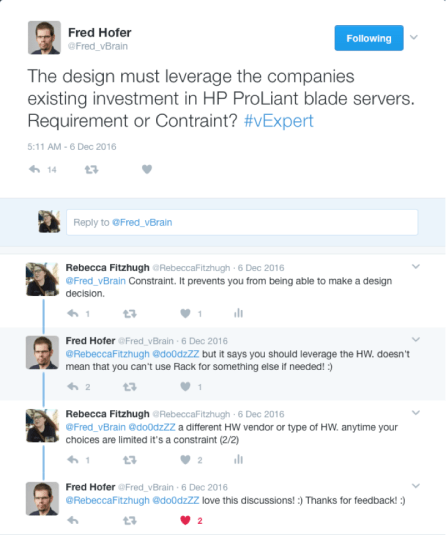
Untitled.png

In this example, because the business dictates that HP ProLiant blade servers must be used, then it is a constraint. This leaves no room for me, as the architect, to make a design decision — it has been already made for me.

Assumptions

Assumptions are design components that are assumed to be valid without proof. Documented assumptions should be validated during the design process. This means by the time the design is implemented, there should be no assumptions.

  • Example: The datacenter uses shared (core) networking hardware across production and nonproduction infrastructures.
  • Example: The organization has sufficient network bandwidth between sites to facilitate replication.
  • Example: Security policies dictate server hardware separation between DMZ servers and internal servers.

These examples are a bit of low-hanging fruit. Don’t be afraid to dig a little bit deeper. If there’s anything documented or stated without empirical proof, then it is an assumption and needs to be validated.

Risks

A risk is anything that may prevent achieving the project goals. All risks should be mitigated with clear SOPs.

  • Example: The organization’s main datacenter contains only a single core router, which is a single point of failure.
  • Example: The proposed infrastructure leverages NFS storage, with which the storage administrators have no experience.

No design is perfect and it is important to document as many risks as you can identify. This will give you the opportunity to be prepared and craft mitigation plans. Not paying close attention here may leave the design in a vulnerable state.

Additional Examples

Can you specify which conceptual model category is correct for each example?

Category

Description

Requirement The design should provide a centralized management console to manage both data centers.
Assumption The customer provides sufficient storage capacity for building the environment.
Constraint The storage infrastructure must use existing EMC storage arrays for this project.
Requirement The platform should be able to function with project growth of 20% per year.
Assumption Active Directory is available in both sites.
Requirement Solution should leverage and integrate with existing directory services.
Risk Both server racks are subject to the same environmental hazards.
Assumption BC/DR plans will be updated to include new hardware and workloads.
Requirement The SLA is 99% uptime.
Constraint External access must be through the standard corporate VPN client.
Risk Having vMotion traffic and VM data traffic on the same physical network can lead to security vulnerability because vMotion is clear text by default.

Resources

To learn more about the enterprise architecture or the VCDX program, please join me, Brett Guarino, Paul McSharry, and Chris McCain at VMworld on Wednesday, 29 August 2018 from 11:00-11:45 to discuss “Preparing for Your VCDX Defense”.

Architecting a vSphere Upgrade

At the time of writing, there are 197 days left before vSphere 5.5 is end of life and no longer supported. I am currently in the middle of an architecture project at work and was reminded of the importance of upgrading — not just for the coolest new features, but for the business value in doing so.

giphy

Last year at VMworld, I had the pleasure of presenting a session with the indomitable Melissa Palmer entitled “Upgrading to vSphere 6.5 – the VCDX Way.” We approached the question of upgrading by using architectural principles rather than clicking ‘next’ all willy-nilly.

Planning Your Upgrade

When it comes to business justification, simply saying “it’s awesome” or “latest and greatest” simply does not cut it.

Better justification is:

  • Extended lifecycle
  • Compatibility (must upgrade to ESXi 6.5 for VSAN 6.5+)
  • vCenter Server HA to ensure RTO is met for all infrastructure components
  • VM encryption to meet XYZ compliance

It is important to approach the challenge of a large-scale upgrade using a distinct methodology. Every architect has their own take on methodology, it is unique and personal to the individual but it should be repeatable. I recommend planning the upgrade project end-to-end before beginning the implementation. That includes an initial assessment (to determine new business requirements and compliance to existing requirements) as well as a post-upgrade validation (to ensure functionality and that all requirements are being met).

There are many ways to achieve a current state analysis, such as using vRealize Operations Manager, the vSphere Optimization Assessment, VMware {code} vCheck for vSphere, etc.

I tend to work through any design by walking through the conceptual model, logical design, and then physical. If you are unfamiliar with these concepts, please take a look at this post.

An example to demonstrate:

  • Conceptual –
    • Requirement: All virtual infrastructure components should be highly available.
  • Logical –
    • Design Decision: Management should be separate from production workloads.
  • Physical –
    • Design Decision: vCenter Server HA will be used and exist within the Management cluster.

However, keep in mind that this is not a journey that you may embark on solo. It is important to include members of various teams, such as networking, storage, security, etc.

Future State Design

It is important to use the current state analysis to identify the flaws in the current design or improvements that may be made. How can upgrading allow you to solve these problems? Consider the design and use of new features or products. Not every single new feature will be applicable to your current infrastructure. Keep in mind that everything is a trade off – improving security may lead to a decrease in availability or manageability.

When is it time to re-architect the infrastructure versus re-hosting?

  • Re-host – to move from one infrastructure platform to another
  • Re-architect – to redesign, make fundamental design changes

Re-hosting is effectively “lifting-and-shifting” your VMs to a newer vSphere version. I tend to lean toward re-architecting as I view upgrades as an opportunity to revisit the architecture and make improvements. I have often found myself working in a data center and wondering “why the hell did someone design and implement storage/networking/etc. that way?” Upgrades can be the time to fix it. This option may prove to be more expensive, but, it can also be the most beneficial. Now is a good time to examine the operational cost of continuing with old architectures.

Ensure to determine key success criteria before beginning the upgrade process. Doing a proof of concept for new features may prove business value. For example, if you have a test or dev cluster, perhaps upgrade it to the newest version and demo using whatever new feature to determine relevance and functionality.

Example Upgrade Plans

Rather than rehashing examples of upgrading, embedded is a copy of our slides from VMworld which contain two examples of upgrading:

  • Upgrading from vSphere 5.5 to vSphere 6.5 with NSX, vRA, and vROPs
  • Upgrading from vSphere 6.0 to vSphere 6.5 with VSAN and Horizon

These are intended to be examples to guide you through a methodology rather than something that should be copied exactly.

Happy upgrading!

Virtual Design Master: Conceptual, Logical, Physical

This year I am honored to be one of the Virtual Design Master (vDM) judges. If you are unfamiliar with vDM, it is a technology driven reality competition that showcases virtualization community member and their talents as architects. Some competitors are seasoned architect while others are just beginning their design journey. To find out more information, please click here. One of the things that I, along with the other judges, noticed is that many of the contestants did not correctly document conceptual, logical, and physical design.

The best non-IT example that I have seen of this concept the following image:

C-3NztMXYAIRbF9.jpg-large
(Figure 1) Disclaimer: I’m not cool enough to have thought of this. I think all credit goes to @StevePantol.

The way I always describe and diagram design methodology is using the following image:

Screen Shot 2017-07-06 at 9.50.05 PM
(Figure 2) Mapping it all together

I will continue to refer to both images as we move forward in this post.

Conceptual

During the assess phase, the architect reaches out to the business’ key stakeholders for the project and explore what each need and want to get out of the project. The job is to identify key constraints and the business requirements that should be met for the design, deploy, and validation phases to be successful.

The assessment phase typically coincides with building the conceptual model of a design. Effectively, the conceptual model categorizes the assessment findings into requirements, constraints, assumptions, and risks categories.

For example:

 Requirements –

  1. technicloud.com should create art.
  2. The art should be durable and able to withstand years of appreciation.
  3. Art should be able to be appreciated by millions around the world.

Constraints –

  1. Art cannot be a monolithic installation piece taking up an entire floor of the museum.
  2. Art must not be so bourgeoisie that it cannot be appreciated with an untrained eye.
  3. Art must not be paint-by-numbers.

Risks –

  1. Lead IT architect at technicloud.com has no prior experience creating art.
    • Mitigation – will require art classes to be taken at local community college.
  2. Lead IT architect is left-handed which may lead to smearing of art.
    • Mitigation – IT architect will retrain as ambidextrous.

Assumptions –

  1. Art classes at community college make artists.
  2. Museum will provide security as to ensure art appreciators do not damage artwork.

As you read through the requirements and constraints, the idea of how the design should look should be getting clearer and clearer. More risks and assumptions will be added as design decisions are made and the impact is analyzed. Notice that the conceptual model was made up entirely of words? Emphasis on “concept” in the word “conceptual”!

Logical

Once the conceptual model is built out, the architect moves into the logical design phrase (which indicated by the arrows pointing backwards in Figure 2, demonstrating dependence on conceptual). Logical design is where the architect begins making decisions but at a higher level.

Logical art work design decisions –

  1. Art will be a painting.
  2. The painting will be of a person.
  3. The person will be a woman.

For those who are having a hard time following with the art example, a tech example would be:

Screen Shot 2017-07-06 at 10.27.57 PM
(Table 1) Logical design decision example

An example of what a logical diagram may look something like this:

Picture1
(Figure 3) Logical storage diagram example

Notice that these are ‘higher’ level decisions and diagrams. We’re not quite to filling in the details yet when working on logical design. However, note that these design decisions should map back to the conceptual model.

Physical

Once the logical design has been mapped out, architect moves to physical design where hardware and software vendors are chosen and configuration specifications are made. Simply put, this is the phase where the details are determined.

Physical art work design decisions –

  1. The painting will be a half-length portrait.
  2. The medium will be oil on a poplar panel.
  3. The woman will have brown hair.

Once again, if you hate the Mona Lisa then the IT design decision example would be:

  1. XYZ vendor and model of storage array will be purchased.
  2. Storage policy based management will be used to place VMs on the correct storage tier.
  3. Tier-1 LUNs will be replicated hourly.

These are physical design decisions, which directly correlate and extend the logical design decisions with more information. But, again, at the end of the day, this should all tie back to meeting the business requirements.

Screen Shot 2017-07-06 at 10.32.54 PM
(Table 2) Physical design decision example

An example of a physical design would be something like:

phys
(Figure 4) Physical storage diagram example

Notice that in this diagram, we’re starting to see more details: vendor, model, how things are connected, etc. Remember that physical should expand on logical design decisions and fill in the blanks. At the end of the day, both logical and physical design decisions should map back to meeting the business requirements set forth in the conceptual model (as evidenced by Figure 2).

Final Thoughts

Being able to quickly and easily distinguish takes time and practice. I am hoping this clarifies some of the mystery and confusion surrounding this idea. Looking forward to seeing more vDM submissions next week.

macOS VCSA Installer “ovftool” Error

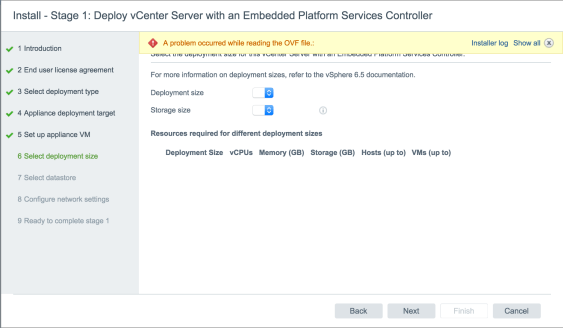
I recently ran into an issue with the vCenter Server Appliance (VCSA) 6.5 installer. When I proceeded to Step 5, “Set up appliance VM” I received the error:

“A problem occurred while reading the OVF file…Error: ovftool is not available.”

Screen Shot 2016-12-19 at 5.00.22 PM.png

After some research, it turns out that macOS Sierra (10.12.x) is not supported and, of course, that is the operating system of my laptop. I found a blog post from Emad Younis that outlines two possible options for working around this error.

I tried both options. Option 1 did not work for me, but Option 2 did. I’d like to take a minute and demonstrate step-by-step what I did to proceed with the VCSA deployment.

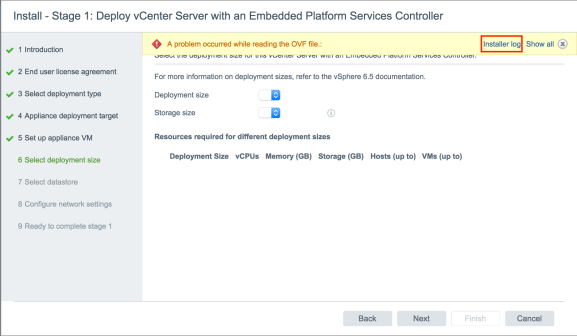
On the deployment wizard error, I selected Installer log.

Screen Shot 2016-12-19 at 5.00.22 PM copy.png

Quickly read through the log and find the error regarding the ovftoolCmd, it will state the directory that the installer is searching for the tool set. Copy that directory, sans /vcsa/ovftool/mac/ovftool.

Screen Shot 2016-12-19 at 5.01.03 PM.png

Launch the Terminal utility and type the open command for Finder to open that directory.

asdfasdf.png

For example:

open /private/var/folders/j8/ttwss5yx6cqf0flb5lrj_hww0000gn/T/AppTranslocation/

As mentioned before, leave off everything from /vcsa/ and on.

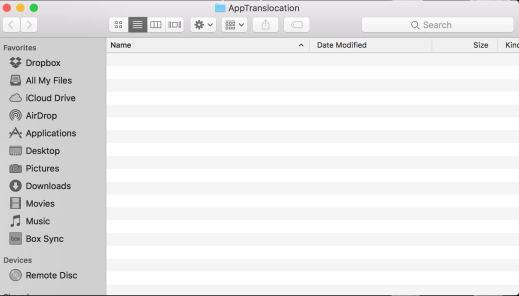
When that directory opens in Finder, you’ll notice that is it empty…therein lies the problem!

empty.png

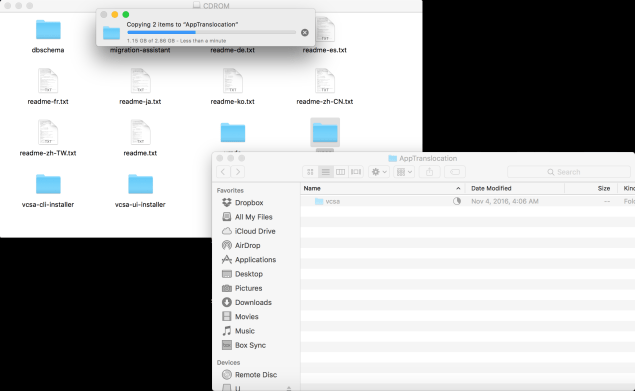
Copy the vcsa folder into this directory.

vcsa.png

Once the vcsa folder has successfully copied, you should be able to go back to the macOS installer, press Back, and then hit Next to go back to Step 5.

Screen Shot 2016-12-19 at 5.04.47 PM.png

You should now be able to select the deployment size options and successfully proceed with the VCSA deployment.

Horizon Agent fails to install: “system must be rebooted” error

Nothing is more fun than walking into a client site on a Monday morning and something that’s supposed to be easy (installing Horizon Agent in base image) doesn’t work.

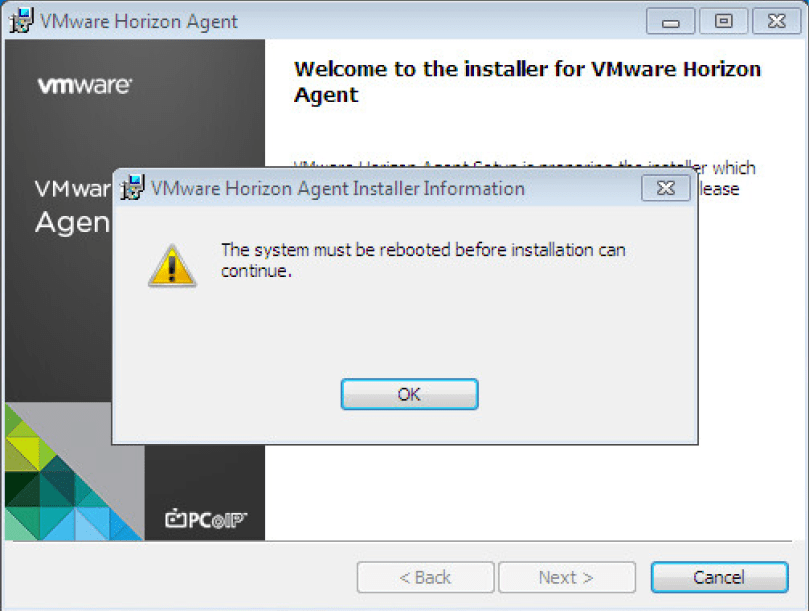
I logged into the Windows 7 virtual desktop image and tried to install the Horizon Agent, however, I received a message stating: “The system must be rebooted before installation can continue.” Seemed simple enough, so I restarted the machine, and tried again. Same error. #facedesk

00.png

Did some digging and found an old KB (1029288). The KB doesn’t say that it is applicable to Horizon View 7.0.x but it solved the issue I was having.

First I tried to uninstall and re-install VMware Tools. No luck.

I went through the registry keys suggested by the aforementioned KB but there weren’t any associated strings associated with the registry keys.

At the very end of the list, two registry keys were listed:

  • HKEY_LOCAL_MACHINE\Software\Microsoft\Windows\CurrentVersion\RunOnce\
  • HKEY_LOCAL_MACHINE\Software\Microsoft\Windows\CurrentVersion\RunOnceEx\

There were values located in HKLM\Software\Microsoft\Windows\CurrentVersion\RunOnce, so I deleted all the values, rebooted the machine.

Voilà! I was finally able to get the Horizon Agent to install so I could proceed with my day. It appeared that there was a previously failed installation that was preventing the Horizon Agent from launching its own installer.

Horizon 7 Instant Clones – Folder Structure

When provisioning Horizon 7 Instant Clones, you may have noticed some new folders that were created in the VM and Template view in the vSphere Web Client.

Screen Shot 2016-12-19 at 9.37.17 AM.png

Each of these folders has a specific purpose for Instant Clones:

  • ClonePrepInternalTemplateFolder
    • cp-template-xxxx –  Virtual machine that is a template used to create Instant Clones; this is created from the master image.
  • ClonePrepParentVmFolder
    • cp-parent-xxxx – These virtual machines exist in a 1:1 relationship to the number of ESXi hosts in the cluster. I have a four node cluster, therefore I have 4 clone prep parent virtual machines. Each ESXi host has one of these powered on and in memory in order to provision the Instant Clone VMs.
  • ClonePrepReplicaVmFolder
    • cp-replica-xxxx – This virtual machine is used to create the clone prep parent virtual machines. It will be also used as necessary to provision additional clone prep parent virtual machines.
  • ClonePrepResyncVmFolder
    • If the Instant Clones are updated with a new image, a virtual machine will be created here for staging purposes.

Learning from Failure – My Path to VCDX (Part II)

ICYMI, you can find Part I here.

Second Attempt – Pass!

The important decision to make whether I should wait or reapply immediately. Brett and I talked a lot about this over the two days following our results. I decided that I would shore up the gaps in our design (primarily our DR plan and the capacity planning) and reapply for the November defense. The deadline for application was Aug 24…that meant I had slightly less than two weeks to edit the design and reapply. Brett decided to wait because he had a lot of work obligations for the second half of the year. Per policy, VCDX partners can defend separately (however, must apply at the same time) but must be within two defenses of each other.

In case you did not know, a second defense on the same design requires a change log to be created. Check out Lior Kamrat’s blog post here.

In hindsight, it was a crazy move to reapply so quickly. Between application and defense in November, I had VMworld US, two Europe trips, and VMworld EU…translating to not a lot of time to prepare. But I felt like I had a better idea of what I needed to do and what the panelists wanted to see.

I talked to many VCDX candidates and VCDXs while at VMworld US and VMworld EU. I listened to all their advice and how they prepared. I’m grateful for the time that so many spent with me.

This time I decided to prepare differently. I was going to do it my way. I went into a little bit of an isolation; I didn’t tweet about it. I didn’t work with as many people, I kept my group small. I just focused on working with my study group. I didn’t do as many mocks for myself (I think only two or three), but I participated in quite a few mocks as a “panelist” for others. I created flashcards for questions I thought panelists would ask. And I completely rebuilt my slide deck so that the intro (or main deck) would talk more to my requirements and constraints, as well as specifically highlight my design decisions.

I went up to Palo Alto a few days before my defense to do some mocks and study with a member of my study group. Unluckily, my defense was the morning after the US election so I stayed up later than I had planned. I went over my slide deck, slide-by-slide, with someone in my study group that night. I woke up early, flipped through my main deck one last time, and then headed to VMware’s campus. While I waited for my panel, I reviewed through my Quizlet sets one more time.

Honestly, I wasn’t sure how I did. I felt more comfortable in the design scenario because I did what I normally do with a client—I wasn’t so focused on following someone else’s template. In the defense section, I felt I did ok but I could tell I wasn’t doing well explaining my networking. I got a little ramble-y in that area. I think I may have made up for that in the scenario. Either way, I was convinced I’d failed again.

To VMware’s credit, they cranked out our results much quicker than in July. I defended on Wednesday and found out my results the following Tuesday. I passed! I’m officially #243.

giphy1

My Thoughts  

  • Make sure your friends and family realize how much time you’ll be dedicating to VCDX.
  • No (wo)man is an island. Surround yourself with a community of others doing the same.
  • Join a study group. Gregg Robertson runs a great one on Google+ and Slack. Join it! But then find a smaller group who are preparing to defend around the same time as you.
  • Have someone (or multiple people) review your design as you are writing it.
  • Review your design and have someone else review your design once submitted. There will be gaps and errors—-find them! Figure out how to address them in your defense.
  • Do mocks! Do more mocks!!
  • Create backup slides in your PPT for reference, but do not be afraid to whiteboard in your defense.
  • Be familiar with your slide deck. You don’t want to waste time fumbling around looking for a slide in the defense. Work out those kinks in mocks.

But you should do what feels right to you. Don’t focus on the techniques that helped others. Don’t feel the need to follow someone else’s template. Achieve VCDX your own way. Grant Orchard (#233) just wrote a brilliant post along the same lines, read it here.

Obligatory Thank You(s) 

First and foremost, I would like to thank my VCDX partner, Brett Guarino, and his wife, Leann, for putting up with us working weekends and late nights and letting me stay all of those weeks in their home in Raleigh while we worked. Thank you to Brett’s managers at VMware for letting him dedicate time to this project. I can’t wait until he gets his number.

And a massive thank you to:

Lastly, Chris Williams, thank you so much for being the only person who responded with notes when we sent our design out for review. Your time reading our design is greatly appreciated and your notes were invaluable.

Learning from Failure – My Path to VCDX (Part I)

I’m excited to announce that I have been awarded the title of VMware Certified Design Expert (VCDX) #243. If you are unfamiliar with the VCDX program, you can find more information here.

My journey towards VCDX began a little over three years ago. I had successfully passed the VCAP5-DCA (May 2013) and VCAP5-DCD (Sept 2013) exams and was trying to figure out what was next for me.

I talked to my friend and former business partner, Brett Guarino, about it several times throughout the next few weeks. Together, we decided to partner up, write a design, and chase this certification together. In October 2013, I wrote an article titled “Why I am Pursuing the VCDX” for VMware Press, publicly announcing my pursuit (that way I could be held accountable). I had no idea what a long road this would be.

giphy

Writing the Design

This part took us forever. I think we underestimated the length of time it would take and it became increasingly difficult to prioritize VCDX time over work. This is primarily because Brett and I were both self-employed when we set out on this endeavor. So for me, taking time off to work on VCDX meant no money coming in for that given time period.

We kicked around a few different designs we worked on, considered doing something completely fictional, but ultimately we landed on a lab infrastructure design we had worked on together. Brett and I selected this design because it was very unique (leverages nested virtualization) but was still fairly simple.

By December 2014 we had put together our first draft of a design document and had created a plethora of diagrams and tables. But…around that time Brett accepted a position with VMware and was trying to settle into this new role. I was still self-employed and had landed a few gigs that were keeping me traveling overseas regularly. Our VCDX design was put on back burner…and it sat there for about a year.

Around Christmas 2015, Brett and I had a frank conversation regarding our pursuit of VCDX. When I had time to work, he was busy; when he was free, I was busy or out of the country. We tried to divide up the sections and conquer them separately but when we weren’t together we found that it was easy to prioritize something else over our design. It was time for us to ‘shit or get off the pot.’ Either we would both dedicate time working on this or we needed to pursue VCDX individually. We decided to give it one more shot together.

I had looked at the VCDX schedule and found that there was a submission deadline in May 2016 to defend in Palo Alto in July 2016. We created a schedule and got to work. We both took off for much of April to sit down and hammer out the rest of the design document together. Within about 2 weeks we had the design document finished and sent to a reviewer. From there, we split up the remaining work of completing the supplementary documentation (installation guide, implementation guide, testing and validation guide, and standard operating procedures). I think we underestimated the amount of time that the supplemental documentation would take.

With the deadline fast approaching, I found myself on a plane to Tel Aviv the day before the submission deadline. I was furiously making last minute adjustments to our documents, re-reading, editing, and trying to finish filling out the application.

We submitted our applications, and then had a drink to celebrate. Idiotically we thought the hard part was finished…we were wrong. Turns out preparing for the defense is far more stressful than writing the design.

First Attempt – Fail!

Once our applications were submitted, it came time to work on our PPT and start to participate in mocks. We should have started immediately after submitting our applications but we didn’t because we both had vacation plans for the end of May. And honestly, we really didn’t think we’d get accepted. We did. I took a week off in June and together we worked on our PPT and did some mocks for the design scenario portion of the design defense.

We both took off work for the two weeks leading up to our defense, crammed, and worked on perfecting our PPT. Through mocks we found quite a few gaps in our design and slide deck and we worked furiously to make more supplemental content (backup slides).

I defended on July 25 and Brett defended on July 26. I must say that I didn’t feel like I had bombed the defense, but didn’t walk out feeling like I’d given an A+ performance. I felt the outcome was 50/50. There were a few things I was hit on for which I was not properly prepared. I didn’t feel great about my design scenario —I think I had read too much about how it should approached by different VCDX bloggers and I tried to follow their approach and it just didn’t feel natural to me when I was in the room.

But I had a lot of time to replay my defense in my head because I didn’t find out my results until Aug 9…slightly over two weeks! I failed (sadly, Brett had failed as well). I’d thought a lot about my defense and I realized that I was completely “defensive” rather than “offensive,” I wasn’t guiding the conversation. I spent too much time in the technical details and not enough time explaining why I made that decision in the first place. Additionally I didn’t feel like I did the best job tying design decisions back to requirements. I was determined to learn from my mistakes.

Virtual Machine Files

vSphere administrators should know the components of virtual machines. There are multiple VMware file types that are associated with and make up a virtual machine. These files are located in the VM’s directory on a datastore. The following table will provide a quick reference and short description of a virtual machine’s files.

net-dvs Command

In order to view more information about the distributed switch configuration, use the net-dvs command. This is only available in the local shell. Notice that it specifies information like the UUID of the distributed switch and the name. We can also see information regarding Private VLANs if we have those set up.

If we keep scrolling down, we can see the MTU and CDP information for the distributed switch. Notice that we can set up LLDP for a distributed switch. Next we see information regarding the port groups and how they are configured, we see VLAN and security policy information here. At the bottom we see some stuff on a network resource pool if we have network i/o control enabled and are using this feature.

The last section we see on the net-dvs output we see is some information that is very useful during the troubleshooting process. We can see whether or not packets are being dropped and we can see from the amount of traffic going in and out and decide on whether we need to traffic shape.